
Your next draftstarts with your voice.
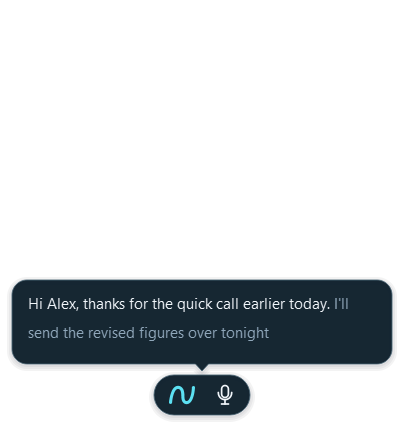
Nima is a voice dictation app for Windows. Click where you want to write, tap Right Ctrl, and speak. Your words appear above the pill before the finished passage lands in your writing field.
Download for WindowsWindows 10 & 11 · Internet required · Free to startInstallation and requirementsChoose a step or play the example. Illustrative text; no recording or AI calls.
Keep your attention on the thought.
There is no separate document to dictate into. Start in the email, message or document field you want to use. Nima previews the transcript while you speak and inserts it once when you finish. Review the result before sending.
Tap Right Ctrl again or choose Finish on the pill. F8 and Ctrl + Space are alternative dictation shortcuts in Settings. Escape cancels without inserting anything.
From spoken thoughts to written sentences.
Choose Smart, Exact or Raw under Your words, and set Paragraphs and lists separately. Smart can clean up filler words, spoken corrections and punctuation. Your personal word list helps with names and terminology.
Polish adds an optional Pro writing style after dictation. Review the finished passage before using it.
You stay in control of where it goes.
If you move to a different field or Nima cannot confirm the target, it keeps the passage available for Copy instead of writing somewhere uncertain. Nima never presses Enter to send your message.
Password fields and some editors are not supported. Try your own everyday writing fields using the Free allowance. Keep your microphone close and review names, dates and numbers.
The actual Windows interface.
A few useful answers.
Can I dictate without holding a key?
Yes. Tap the dictation shortcut to start and tap again to finish. You do not have to hold it while speaking.
Can I use more than one language?
Nima supports 84 language and regional entries. The Windows keyboard layout selects the dictation language unless you choose one explicitly. Translation is a separate choice.
Is this meeting transcription?
Nima is designed for dictating into a writing field. It is not a meeting recorder or an audio-file transcription service.
Try it with your
own everyday words.
Free includes 2,000 words a week and 1 hour of reading a month. No card needed.
Download for Windows Compare Free and Pro